Collect guest feedback and act before they check out
Automated in-stay survey software for hotels and resorts: customizable CSAT and NPS questionnaires, staff alerts when ratings drop below threshold, analytics dashboard by department, and smart redirect to Google Reviews and TripAdvisor when the guest experience is positive.
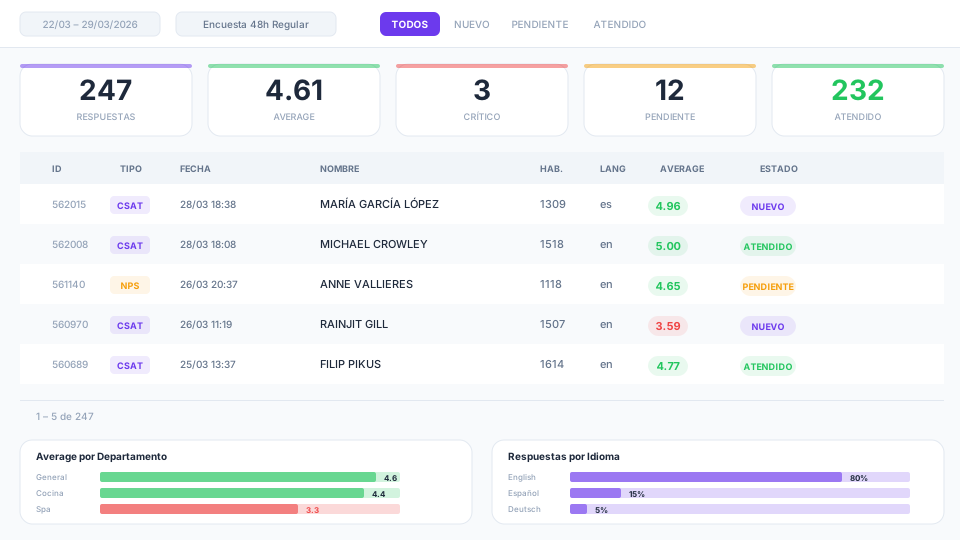
48h Survey
CSAT · 12 questions
247
Responses
4.61
Average
3
Critical
92%
Resp. rate
Are you discovering problems when it's already too late?
Post-checkout opinions
The guest already left and the bad review is already on Google. You couldn't collect their feedback in time or resolve the issue during their stay.
No service quality data by area
You don't know if the problem is the kitchen, spa, housekeeping, or front desk. Without department-level breakdown, you can't measure service quality or act with precision.
Avoidable negative reviews
The unsatisfied guest publishes negative opinions on TripAdvisor or Google without anyone asking them first or being able to improve their experience.
Paper or generic surveys
Paper forms that nobody analyzes, or external tools disconnected from the PMS and without guest stay context. Zero automation.
Generic surveys vs Hoteligy
| Generic tool | Hoteligy | |
|---|---|---|
| Timing | Post-checkout, too late | In-stay — during the stay, in time to resolve |
| Question types | Stars or text only | Stars, smileys, hearts, yes/no, free text, dropdown |
| Alerts | Not available | Automatic email to staff when score drops below threshold |
| Departments | No breakdown | Each question assigned to a department with individual averages |
| Online reviews | No connection | Redirect to Google, TripAdvisor, HolidayCheck only if rating is positive |
| Dashboard | Basic or non-existent | Results table, charts by question/department/language, trend reports |
| PMS | No integration | Integrated — segment, room, language, and guest data |
Over 500 hotels trust Hoteligy












Everything you need to measure satisfaction and improve service quality
Questionnaire builder
Create CSAT and NPS satisfaction surveys from the CMS. Configure questions with stars, smileys (3 or 5), hearts, yes/no, free text, or dropdown. Assign each question to a department to measure service quality by area.
Automated threshold alerts
Notify staff by email when guest feedback on a survey or question drops below the set threshold. Automatically request guest opinions if the rating is low.
Online reputation booster
When the rating is positive (above threshold), proactively invite the guest to share their opinion on Google Reviews, TripAdvisor, or HolidayCheck. Protect and improve your online reputation.
Three views to analyze every rating
Results table
All responses one by one. Filter by questionnaire, status (new, pending, attended), critical only. Add internal comments and change each rating's status.
Charts and statistics
Average by question and department over time. Response pattern by hour and weekday (heatmap). Distribution by language and individual question breakdown.
Trend report
Compare the average of each question and department for the period, month, and year. Trend indicators (up/down) to detect improvements or regressions.
Varied response types
Stars, satisfaction smileys (3 or 5 levels), hearts, thumbs up/down, yes/no buttons, free text, and preset dropdown options.
Department breakdown
Assign each question to a department (kitchen, spa, front desk, housekeeping...). Get individual averages and service quality trends per area.
CSAT and NPS compatible
Create standard CSAT surveys or NPS questionnaires with a main recommendation question and secondary context questions. Both formats in a single system.
Conditional observations
Request guest opinions and comments always, or only when the response is below the threshold. Staff see qualitative feedback directly in the dashboard.
Expiration rules
Set questionnaires to expire X days after sending or automatically when the guest checks out. Avoid outdated satisfaction surveys.
Customizable fields
Configure which fields are requested in the survey form. Adapt each questionnaire to the hotel or resort type, segment, or stay moment.
ReviewPro (Shiji) integration
Collected ratings and guest opinions are automatically sent to ReviewPro as another in-stay channel. Centralize all online reputation on a single platform.
PMS integration
Knows the segment, room, language, and plan of each guest. Automatically segment survey distribution and personalize questionnaires based on guest profile.
See the guest satisfaction survey system in action
Video coming soon
Want to see the survey dashboard live?
We'll demo it with real hotel data.
What does your hotel gain?
Resolve before checkout
Collect real-time guest feedback during the stay and act in time. The guest leaves with a positive experience instead of publishing negative opinions online.
Improve your online reputation
Redirect satisfied guests to Google Reviews and TripAdvisor. Only when the rating exceeds the threshold, to protect and continuously improve your score.
Continuous improvement by department
Each department sees their score, trends, and alerts. Improve hotel service quality with decisions based on real data, not impressions.
Collect guest opinions across all channels
Distribute satisfaction surveys from the webapp, via push or email with marketing in-stay, or let the chatbot collect guest experience feedback.
"In-stay surveys let us detect issues before checkout. Since implementing them, our Google ratings went from 4.1 to 4.5 because we resolve problems before the guest leaves."
General Manager
4★ All Inclusive Resort, Riviera Maya
Frequently asked questions about guest satisfaction surveys for hotels
What types of questions can I create?
Stars (1-5), satisfaction smileys (3 or 5 configurable levels), hearts, yes/no with thumbs or buttons, free text, and preset dropdown options. Each questionnaire can combine several types.
Are surveys sent during the stay or after?
During the stay (in-stay). You can schedule sending 48h after check-in, for example, to detect problems in time to resolve them before checkout.
How do threshold alerts work?
You define a minimum threshold (e.g., 3.5/5). If a guest scores below it, the system sends an automatic email to the responsible department staff so they can act immediately.
Can I request observations only when the score is low?
Yes. You can configure comment requests to appear always, or only when the response is below the threshold. This way you collect qualitative feedback right when you need it most.
Does it integrate with ReviewPro?
Yes. Collected ratings are automatically sent to ReviewPro (Shiji) as another in-stay channel, centralizing all your online reputation on a single platform.
How does the redirect to Google Reviews work?
When a guest completes the survey with a positive rating (above the configured threshold), the system proactively invites them to share their experience on Google, TripAdvisor, or HolidayCheck.
What does the results dashboard include?
Three views: individual results table with filters and status, charts panel (average by question, department, heatmap, languages, breakdown), and trend report with period/month/year comparison.
Can I assign questions to departments?
Yes. Each question is assigned to a department (kitchen, spa, front desk, housekeeping, entertainment...). The dashboard shows individual department averages and their time-based trends.
Does it support NPS surveys?
Yes. Compatible with the NPS standard: main recommendation question and secondary context questions. Also supports standard CSAT. Both formats in the same module.
Does it have expiration rules?
Yes. You can set questionnaires to expire X days after sending, or deactivate automatically when the guest checks out.
How are surveys distributed?
From the guest webapp, via push notifications, popup, or email using the marketing in-stay module. Also available on kiosks and Smart TV.
Does it integrate with the PMS?
Yes. The system knows each guest's segment, room, language, and plan. Allows segmenting survey distribution and personalizing questionnaires based on profile.
Turn guest feedback into continuous improvement
Request a demo and discover how in-stay satisfaction surveys improve the guest experience and your hotel's online reputation.